SharePoint Admin Shortcuts – Chrome Extension
A productivity tool for SharePoint and Microsoft 365 administrators that provides instant access to commonly used administration pages through a convenient side panel.
Get the browser extension Google Chrome Store
What This Extension Does
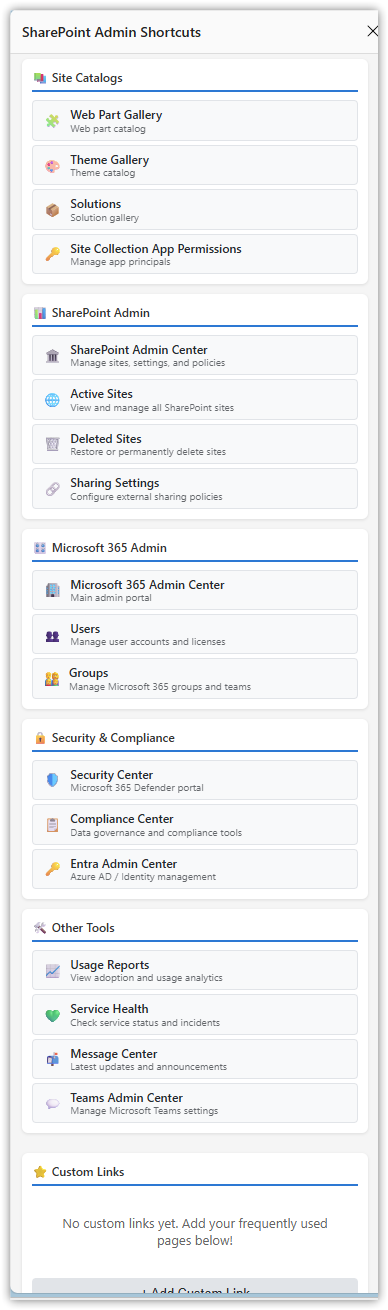
SharePoint Admin Shortcuts eliminates the tedious navigation through multiple menus and bookmarks by providing one-click access to essential SharePoint and Microsoft 365 administration pages. When you click the extension icon, a side panel opens displaying organized links to admin pages for the SharePoint site you’re currently viewing, plus tenant-wide admin centers.
Key Features
Dynamic Site Detection
– Automatically detects the SharePoint site you’re viewing
– Updates links in real-time as you navigate between sites
– Displays site-specific administration pages with correct URLs
Comprehensive Link Collection
– Current Site Links (20+): Site Settings, Libraries & Lists, Permissions, Content Types, Recycle Bins, Analytics, and more
– Site Catalogs: Web Part Gallery, Theme Gallery, Solutions, App Permissions
– Tenant Admin Centers: SharePoint Admin, Microsoft 365 Admin, Security, Compliance
– Quick Access Tools: Service Health, Message Center, Usage Reports, Teams Admin
Custom Links
– Add your own frequently-accessed SharePoint pages
– Include custom titles, descriptions, and emoji icons
– Links sync across your Chrome browsers via Chrome sync storage
– Easy delete functionality for links you no longer need
Always Accessible
– Side panel design stays open while you navigate
– Doesn’t interfere with your SharePoint work
– Compact, scrollable interface with all links visible
– Automatic refresh when switching tabs or sites
Why Use This Extension?
For SharePoint Administrators
SharePoint administration involves constantly switching between dozens of different admin pages scattered across multiple admin centers. Without this extension, you typically need to:
– Navigate through multiple menu levels to find admin pages
– Remember or bookmark dozens of specific URLs
– Manually construct URLs for different site collections
– Keep multiple tabs open to access different admin areas
This extension solves these problems by:
– Providing instant access to all admin pages from any SharePoint page
– Automatically building correct URLs for the current site
– Organizing links logically by function
– Staying open in a side panel while you work
Common Use Cases
– Site Management: Quickly access Site Settings, Libraries, Permissions without drilling through menus
– Troubleshooting: Jump to Service Health, Audit Logs, or Storage Metrics in one click
– Content Administration: Immediate access to Content Types, Site Columns, Recycle Bins
– Multi-Site Management: Automatically updates links as you switch between site collections
– Team Collaboration: Add your team site or frequently-accessed pages as custom links
Get the browser extension Google Chrome Store
Privacy & Security
What This Extension Does NOT Do:
– Does NOT collect, store, or transmit any user data
– Does NOT track your browsing activity
– Does NOT access or modify SharePoint page content
– Does NOT make external API calls or connect to third-party services
– Does NOT require authentication or login
What Data Is Stored:
– Only your custom links (if you add any) are stored locally using Chrome’s sync storage
– No other data is collected or stored
Permissions Explained:
– storage: Required to save your custom links locally
– sidePanel: Required to display the extension as a side panel
– tabs: Required to detect which SharePoint site you’re currently viewing
– host_permissions (*.sharepoint.com): Required to read the current tab’s URL to build site-specific links
All functionality is completely local to your browser. The extension simply builds and displays links based on the SharePoint site URL you’re currently viewing.
Installation
From Chrome Web Store (Recommended)
1. Visit the Chrome Web Store
2. Search for “SharePoint Admin Shortcuts”
3. Click “Add to Chrome”
4. Click the extension icon to open the side panel
How to Use
1. Navigate to any SharePoint site in your organization
2. Click the extension icon in your Chrome toolbar
3. The side panel opens displaying:
– The current site’s URL at the top
– All available admin links for that site
– Tenant-wide admin center links
– Your custom links (if any)
4. Click any link to open that admin page in a new tab
5. Navigate to a different site – the links automatically update
6. Add custom links using the “+ Add Custom Link” button at the bottom
Adding Custom Links
1. Click “+ Add Custom Link” at the bottom of the side panel
2. Enter a title (e.g., “My Team Site”)
3. Enter the full URL
4. Optionally add a description
5. Optionally add an emoji icon
6. Click “Save Link”
7. Your custom link appears in the Custom Links section
Tips
– Pin the extension icon to your toolbar for easy access
– The side panel stays open while you navigate
– Custom links sync across all your Chrome browsers
– Hover over links to see descriptions
Technical Details
Built With:
– Vanilla JavaScript (no frameworks)
– Chrome Extension Manifest V3
– Chrome Side Panel API
– Chrome Storage Sync API
Browser Compatibility:
– Chrome 114+ (required for Side Panel API)
– Microsoft Edge 114+ (Chromium-based)
For Reviewers
This extension is designed specifically for SharePoint administrators who manage Microsoft 365 environments. The code is straightforward and unminified for easy review:
– No external dependencies – Pure vanilla JavaScript
– No external API calls – All links are constructed locally
– No data collection – Only optional custom links are stored locally
– No content modification – Extension only displays links, doesn’t modify SharePoint pages
The extension provides value by consolidating access to legitimate Microsoft admin pages that administrators access regularly as part of their job duties.
For feature requests, please visit the support page at cdsmythe.com.
Get the browser extension Google Chrome Store
License
This extension is free to use for SharePoint and Microsoft 365 administration purposes.
## Changelog
### Version 1.0 (Initial Release October 2025)
– Side panel interface with organized admin links
– Automatic site detection and URL generation
– 20+ built-in SharePoint site admin links
– 4 site catalog links
– 15+ tenant admin center links
– Custom links feature with add/delete functionality
– Chrome sync storage integration
– Real-time site switching detection
– Compact, scrollable interface design
Privacy Policy – SharePoint Admin Shortcuts
Last Updated: October 2025
Data Collection
SharePoint Admin Shortcuts does NOT collect, store, or transmit any user data.
Data Storage
The only data stored locally is:
– Custom links you optionally add (stored in Chrome’s sync storage)
– No browsing history, personal information, or usage analytics are collected
Permissions
– storage: Used only to save your custom links locally
– sidePanel: Used to display the extension interface
– tabs: Used to detect which SharePoint site you’re viewing
– host_permissions: Used to read the current URL to build admin links
Third-Party Services
This extension does NOT:
– Make external API calls
– Connect to third-party services
– Track user behavior
– Send data to external servers
Contact
For questions: https://cdsmythe.com